Groupby
- SQL groupby 명령어와 같음
- split → apply → combine 과정을 거쳐 연산
df.groupby("Team")["Points"].sum()
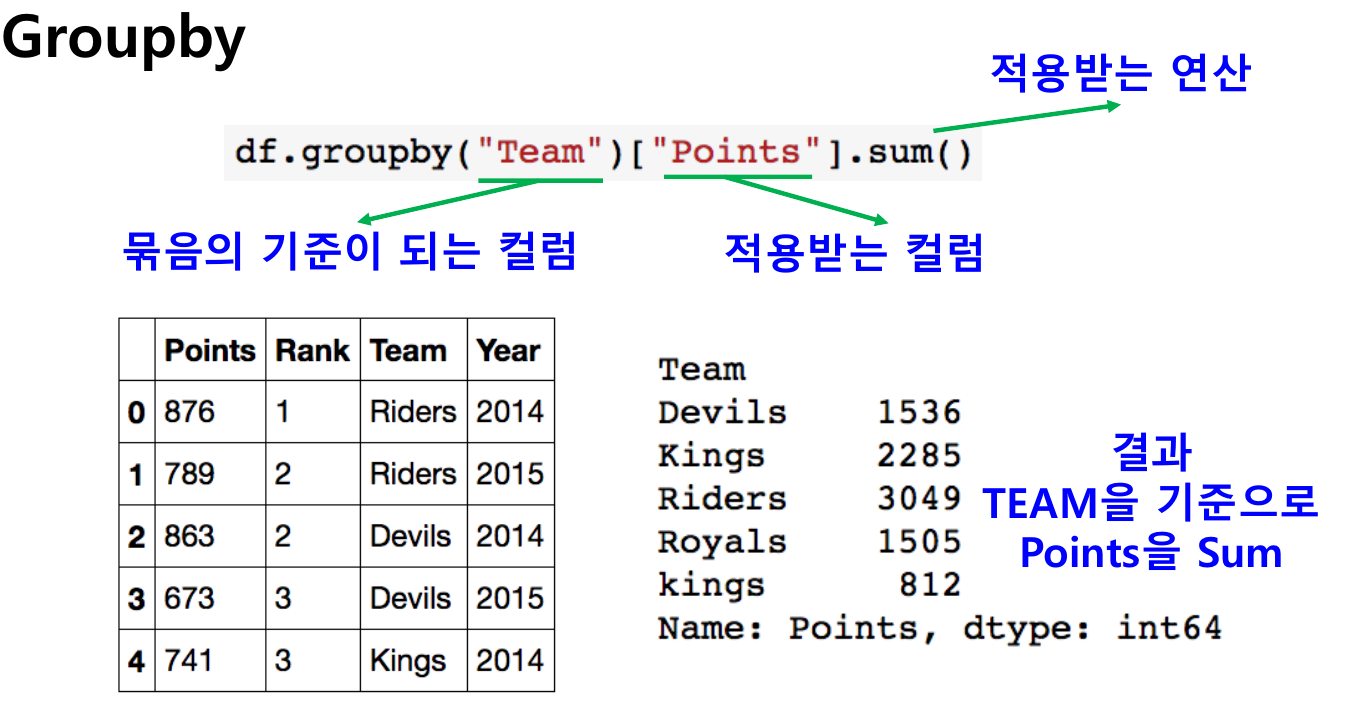
- 한 개이상의 column을 묶을 수 있음.
df.groupby([ "Team", "Year"] )["Points"].sum( )
Hierarchical index
- Groupby 명령의 결과물도 결국은 dataframe
- 두 개의 column으로 groupby를 할 경우, index가 두개 생성됩니다.
h_index.unstack() ★
- Group으로 묶여진 데이터를 matrix형태로 전환해줍니다.
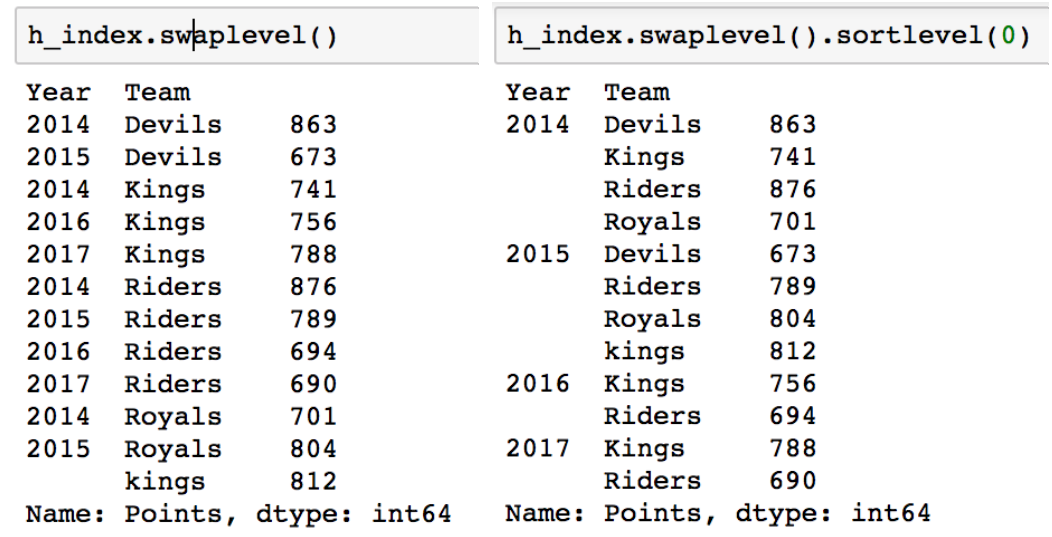
> swaplevel
- Index level을 변경할 수 있음
> operations
- Index level 기준으로 기본 연산 수행 가능
h_index.sum(level = 0) # 위 예시에서 Team끼리 값 합쳐져서 나옴
h_index.sum(level = 1) # 위 예시에서 Year끼리 값 합쳐져서 나옴
Groupby - gropued
- Groupby에 의해 Split된 상태를 추출 가능.
grouped = df.groupby("Team")
for name, group in grouped:
print( name , group )
튜플 형태로 그룹의 Key값 Value값이 추출 됨
grouped.get_group("Devils") : 특정 Key값을 가진 그룹의 정보만 추출 가능
> Groupby - gropued
- 추출된 group 정보에는 세 가지 유형의 apply가 가능함
- Aggregation : 요약된 통계정보를 추출해줌
grouped.agg(sum)
grouped.agg(np.mean)
grouped["Points"].agg([np.sum, np.mean, np.std]) # 특정 컬럼에 여러개의 function을 Apply할 수 도 있음.
- Transformation : 해당 정보를 변환해줌
Aggregation 과 달리 key값 별로 요약된 정보가 아님.
개별 데이터의 변환을 지원함
단 max나 min 처럼 Series 데이터에 적용되는 데이터들은 Key값을 기준으로 Grouped된 데이터 기준
score = lambda x : (x - x.mean()) / x.std()
grouped.transform(score)
- Filtration : 특정 정보를 제거 하여 보여주는 필터링 기능
특정 조건으로 데이터를 검색할 때 사용
df.groupby( "Team" ).filter(lambda x: len(x) >= 3 )
df.groupby( "Team" ).filter(lambda x: x["Rank"].sum() > 2 )
: filter안에는 boolean 조건이 존재해야함.
len(x)는 grouped된 dataframe 개수
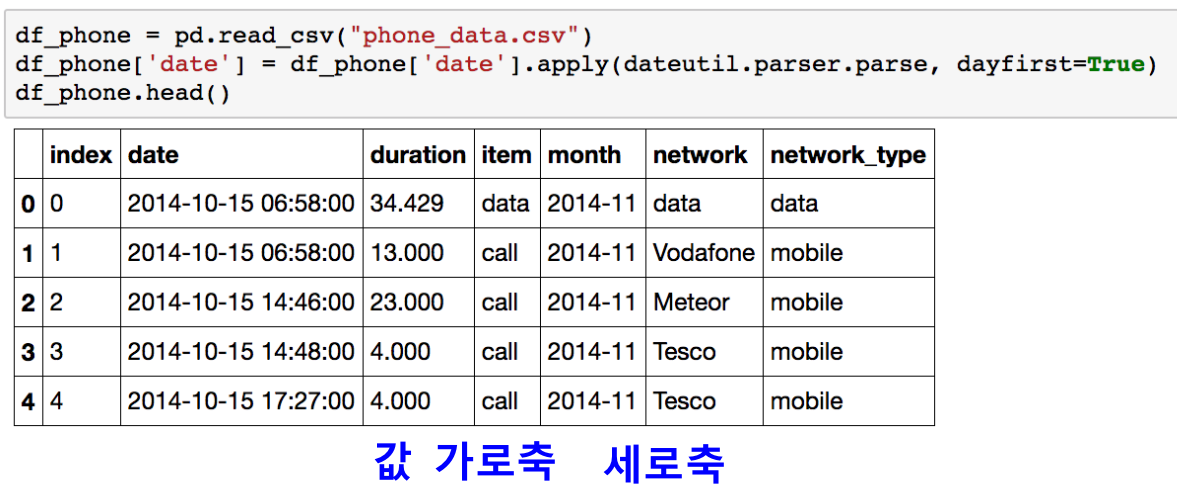
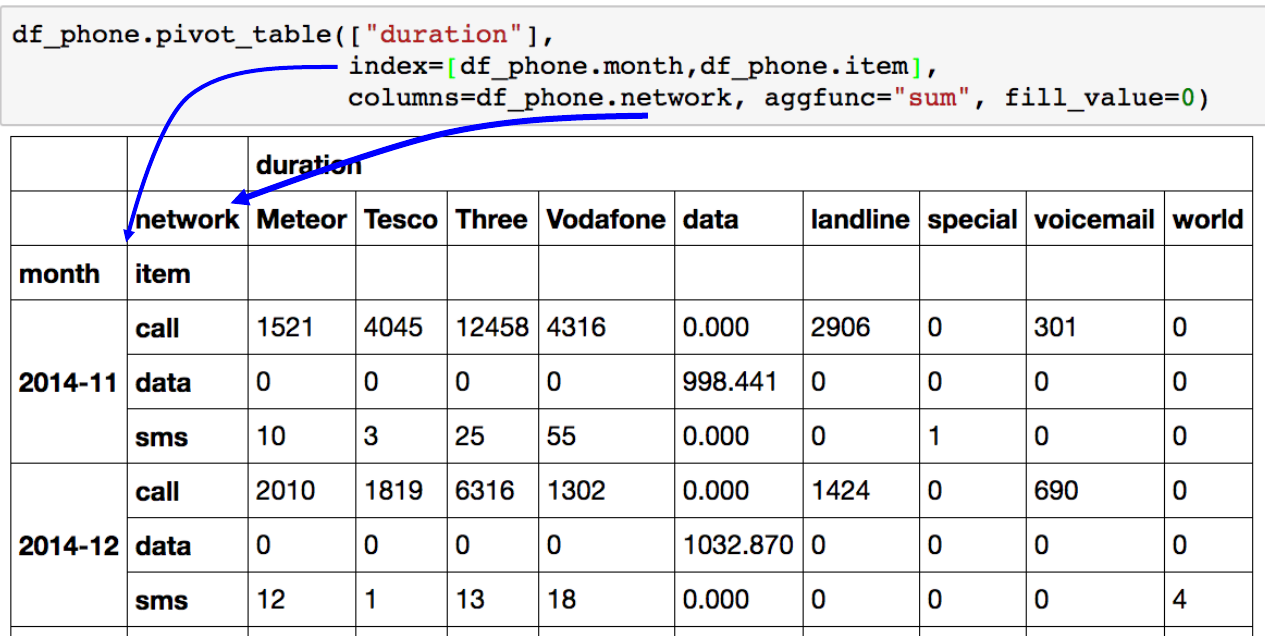
Pivot Table ( Groupby로 했 던 것들 할 수 있음. )
- 우리가 Excel에서 보던 그 것
- Index 축은 groupby와 동일함
- Column에 추가로 labelling 값을 추가하여,
- Value에 numeric type 값을 aggregation 하는 형태
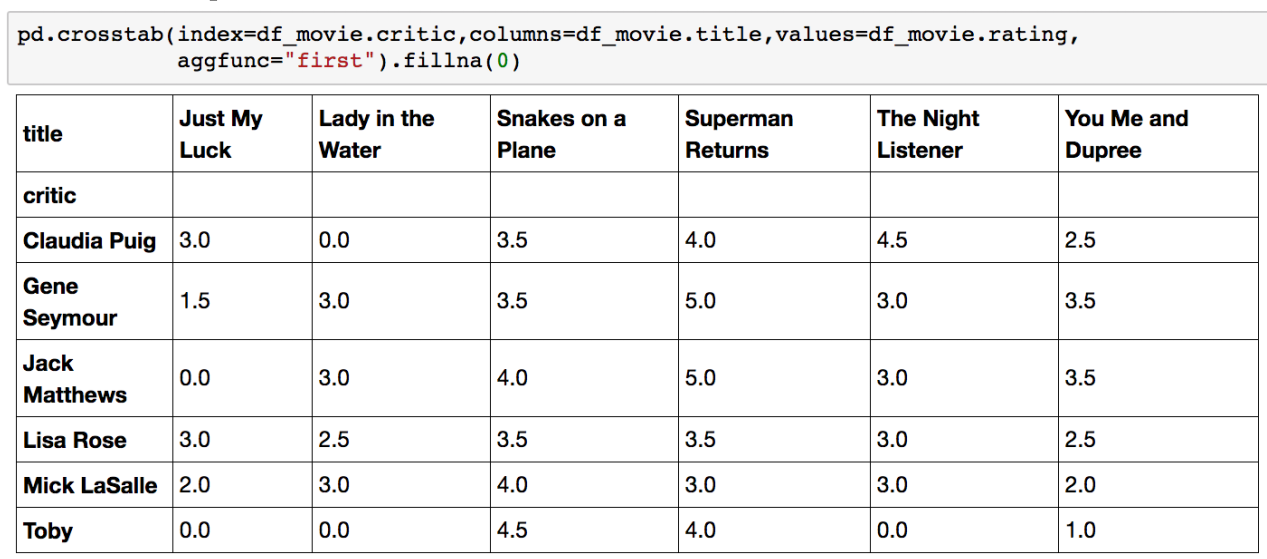
Crosstab
- 특허 두 칼럼에 교차 빈도, 비율, 덧셈 등을 구할 때 사용
- Pivot table의 특수한 형태
- User-Item Rating Matrix 등을 만들 때 사용 가능함.
Merge
- SQL에서 많이 사용하는 Merge와 같은 기능
- 두 개의 데이터를 하나로 합침.
만약 두 dataframe이 column이름이 같다면 on으로 하면된다.
pd.merge(df_a, df_b, on='subject_id')
만약 두 dataframe이 column이름이 다르다면
pd.merge(df_a, df_b, left_on='subject_id' , right_on='subject_id' )
pd.merge(df_a, df_b, left_on='subject_id' , how='left' )
pd.merge(df_a, df_b, right_index=True, left_index=True)
DB Persistence
- Data loading 시 db connection 기능을 제공
# Database 연결 코드
import sqlite3
conn = sqlite3.connect("./data/flights.db")
cur = conn.cursor()
cur.execute("select * from airlines limit 5;")
results = cur.fetchall()
# db 연결 conn을 사용하여 dataframe 생성
df_airplines = pd.read_sql_query("select * from airlines;", conn )
df_airports = pd.read_sql_query("select * from airports;", conn )
df_routes = pd.read_sql_query("select * from routes;", conn )
'공부 정리 ( 강의 ) > AI 기초' 카테고리의 다른 글
| 4.3.1. 파이썬 시각화 툴 (0) | 2023.01.02 |
|---|---|
| 4.2.2. 확률론 맛보기 (0) | 2023.01.02 |
| 4.1.2. 딥러닝 학습방법 이해 (0) | 2022.12.30 |
| 4.1.1. pandas 1 (0) | 2022.12.29 |
| 3.2. 경사하강법 (0) | 2022.12.29 |